

KEY TAKEAWAYS
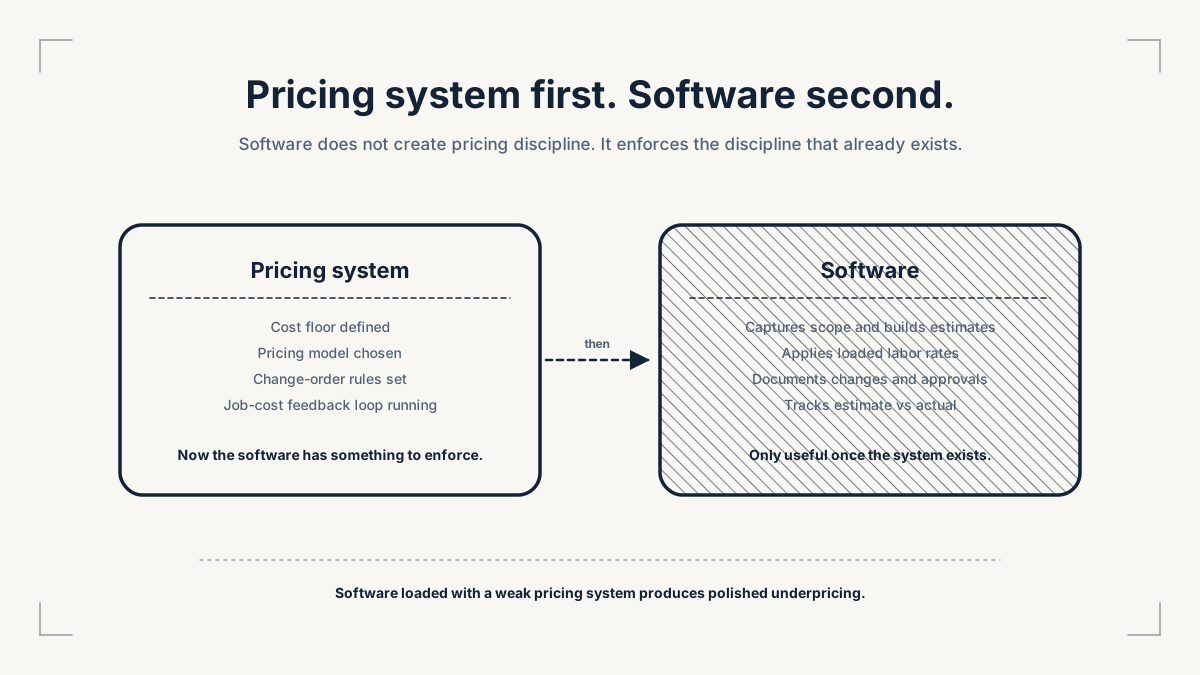
- Contractor estimating software should not be used to disguise weak pricing. It should make scope, cost, risk, change, and margin easier to control.
- A contractor is not ready for software until they know their cost floor, pricing model, owner pay, overhead recovery, labor burden, and change-order rules.
- The most useful tools connect estimate to actual: what was priced, what changed, what the job cost, and what margin survived.
- Cheap software can become expensive when it forces the business to duct-tape estimating, job costing, scheduling, client communication, and accounting.
- Forja's view is that software should support the operating system, not replace it.
DEFINITION
Contractor estimating software is a tool or system that helps a contractor build, document, price, and manage estimates. It may include takeoff, cost libraries, labor rates, templates, proposal creation, approvals, change orders, job costing, and reporting.
The important word is "helps."
Software does not decide what the business must recover. It does not know whether owner pay is missing. It does not know whether a fixed price is fair when the scope is uncertain. It does not know whether the contractor has priced setup, supervision, travel, warranty, rework, and client communication.
Those are operating decisions.
Forja's position is simple: buy software after the pricing system is clear enough for software to enforce.
What should contractor estimating software actually do?
Contractor estimating software should make a good pricing process easier to run.
It should help a contractor:
- capture scope,
- measure quantities,
- price materials,
- apply labor rates,
- include labor burden,
- recover overhead,
- document assumptions,
- create proposal options,
- manage allowances,
- trigger change orders,
- compare estimate to actual,
- and learn from job history.
Autodesk's construction estimating software guide frames estimating software around quantity takeoff, project scope, cost data, collaboration, and more accurate bids. Its Forma Estimate page also emphasizes connected takeoff, centralized cost libraries, markups, indirect costs, reserves, and estimating reports.
That is useful. But the tool is only as good as the pricing logic inside it.
If a contractor loads incomplete rates into a good tool, the tool will produce polished underpricing. If a contractor ignores owner time, the software will not automatically create a healthy business. If allowances are vague, the proposal may look professional while the job remains exposed.
The right question is not "What is the best contractor estimating software?"
The better question is:
“What pricing failure are we trying to stop?”
Forja Insights
When is a contractor ready for estimating software?
Free Tool
Estimate Margin Audit
Audit the margin in your next estimate before the quote leaves the business — where owner pay, overhead, scope, risk, pricing model, and change-order control are quietly eroding profit.
Audit my next estimate5 min · Free · No credit card
A contractor is ready for estimating software when the business can answer the questions the software will force into the open.
Use the Forja Tool Readiness Gate:
Cost floor
Do we know direct cost, labor burden, overhead, owner pay, risk, and target profit?
The software needs a complete cost base
Scope control
Do we know what is included, excluded, assumed, and undecided?
Templates cannot fix vague scope
Pricing model
Do we know when to use fixed price, allowances, T&M, cost-plus, or paid design?
The model must match the risk
Change discipline
Do we know what triggers a change order?
Changes must be captured before margin leaks
Job-cost feedback
Do we compare estimated cost to actual cost after the job?
Estimates improve only when the business learns
Client communication
Do we explain assumptions, approvals, and changes clearly?
Software records communication, but it cannot create trust by itself
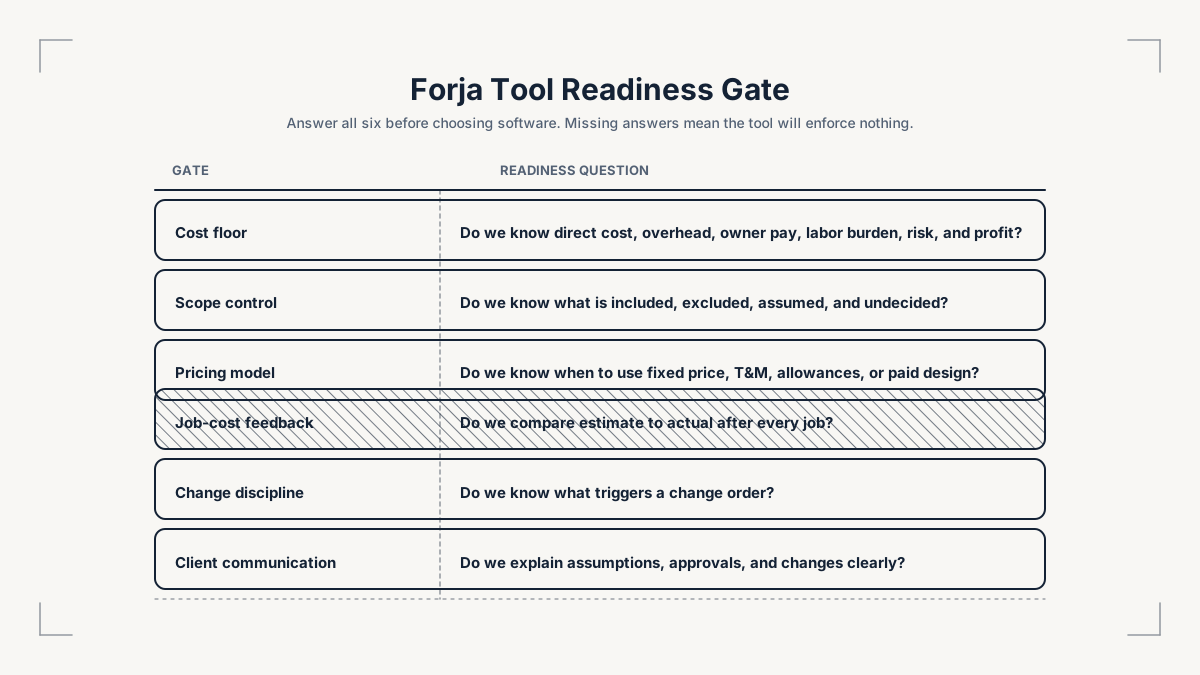
If those answers are missing, software may still help with speed. It may not help with profit.
This is where many home improvement businesses get trapped. They know the current spreadsheet is messy. They know proposals are slow. They know the owner is carrying too much estimating and admin work. So they buy a tool. Then the business recreates the same weak process inside a cleaner interface.
That is not transformation. It is a better-looking version of the same leak.
What pricing failures should software make visible?
A useful tool should expose pricing failures, not hide them.
Scope is unclear
Estimating templates and proposal builder
Included work, exclusions, assumptions, and client decisions
Materials are guessed
Takeoff and cost library
Quantities, supplier assumptions, validity period, and waste factor
Labor is underpriced
Labor-rate library and job costing
Loaded labor rate, setup, travel, cleanup, and supervision
Owner time is invisible
Estimating workflow and overhead allocation
Estimating, sales, project management, and follow-up time
Changes are missed
Change-order management
Approval, cost, timeline impact, and status
Job margin is unknown
Job costing and reporting
Estimate vs actual by job, crew, trade, and project type
Client communication is weak
CRM and project communication
Decisions, approvals, messages, delays, and expectations
Cash flow is unstable
Invoicing and progress billing
Milestones, deposits, outstanding balance, and billing status
ServiceTitan's job costing software page is relevant because it frames job costing around real-time visibility into materials, equipment, purchase orders, labor burden, invoices, and profitability. That is the direction contractors should care about: the estimate should not die when the proposal is accepted. It should become the baseline for delivery control.
Trimble's change-order documentation also shows why change orders belong inside the estimating system. A change order is not a side note. It changes what was priced.
The bridge between pricing and software is simple:
“If the job changes, the estimate must change. If the actual cost changes, the next estimate must learn.”
Forja Insights
Which features matter before a contractor buys?
Feature lists can become noisy. Most contractors do not need every feature first.
They need the features that protect pricing discipline.
Start with these:
Cost library
Keeps materials, subcontractors, labor, and common line items consistent
Loaded labor rates
Prevents wage-only pricing from ignoring burden, setup, travel, and supervision
Templates by job type
Separates routine work from custom, uncertain, or premium work
Assumptions and exclusions
Makes the quote's boundaries visible
Allowance tracking
Prevents undecided selections from becoming free upgrades
Change-order workflow
Captures scope changes before work proceeds
Estimate-to-actual reporting
Shows whether the quote survived delivery
Approval history
Protects trust when decisions change
Accounting integration
Reduces duplicate entry and missing cost data
Mobile or field access
Lets site realities update the office before the margin is gone
Do not choose a tool only because it produces attractive proposals. A beautiful proposal can still be a bad price.
Do not choose a tool only because it is cheap. Cheap is useful only if it reduces the right kind of work. If it creates duplicate entry, weak reporting, disconnected communication, and missing job-cost data, the business may pay for the discount later.
Do not choose a tool only because it is popular. A roofing repair business, a premium interior fit-out operator, a maintenance contractor, and a multi-trade remodeler do not have the same operating problem.
The software should fit the pricing risk.
Why cheap software can become expensive
Many contractors start with cheaper tools for good reasons. They want to preserve cash. They are not ready for a large system. They do not want complexity. That is understandable.
The problem begins when cheaper tools force the contractor to duct-tape the business.
One tool holds the estimate. Another holds the client messages. A spreadsheet holds the materials. The owner's phone holds the decisions. Accounting holds the invoices. The site supervisor remembers the change. Nobody can see the job margin until it is too late.
That is not a software stack. It is a memory test.
The hidden cost appears in:
- duplicated admin,
- missed approvals,
- inconsistent rates,
- old material prices,
- untracked owner time,
- late change orders,
- poor handoff from sales to delivery,
- unclear client communication,
- and jobs that cannot teach the next estimate.
Forja's founder signal from this cluster is direct: many contractors overestimate their ability to deliver and underestimate the operating system required to deliver. Cheap software becomes risky when it supports that overconfidence instead of correcting it.
This does not mean small contractors should buy the most expensive platform. It means they should choose the simplest tool that can still protect the pricing system.
The practical test is whether the tool reduces owner dependency. If every estimate still requires the owner to remember old supplier prices, manually adjust labor assumptions, chase client selections in text messages, and reconcile the final invoice against a separate spreadsheet, the business has not become more controlled. It has only moved the mess into more places.
That is why software evaluation should include handoff quality. A serious system should help the sales conversation become a delivery plan, help the delivery plan become job-cost evidence, and help that evidence improve the next quote. If the tool cannot support that chain, the contractor may still need it for one narrow task, but they should not confuse it with an operating system.
How should software connect estimate to actual?
The best estimating system is not only a quote generator. It is a feedback loop.
Estimate
What did we think the job would cost?
Proposal
What did we promise the client?
Approval
What assumptions did the client accept?
Delivery
What actually happened on site?
Change order
What changed scope, cost, or time?
Job costing
What did labor, materials, supervision, and subcontractors actually cost?
Margin review
What margin survived after owner pay, overhead, risk, and rework?
Rate update
What should change before the next estimate?
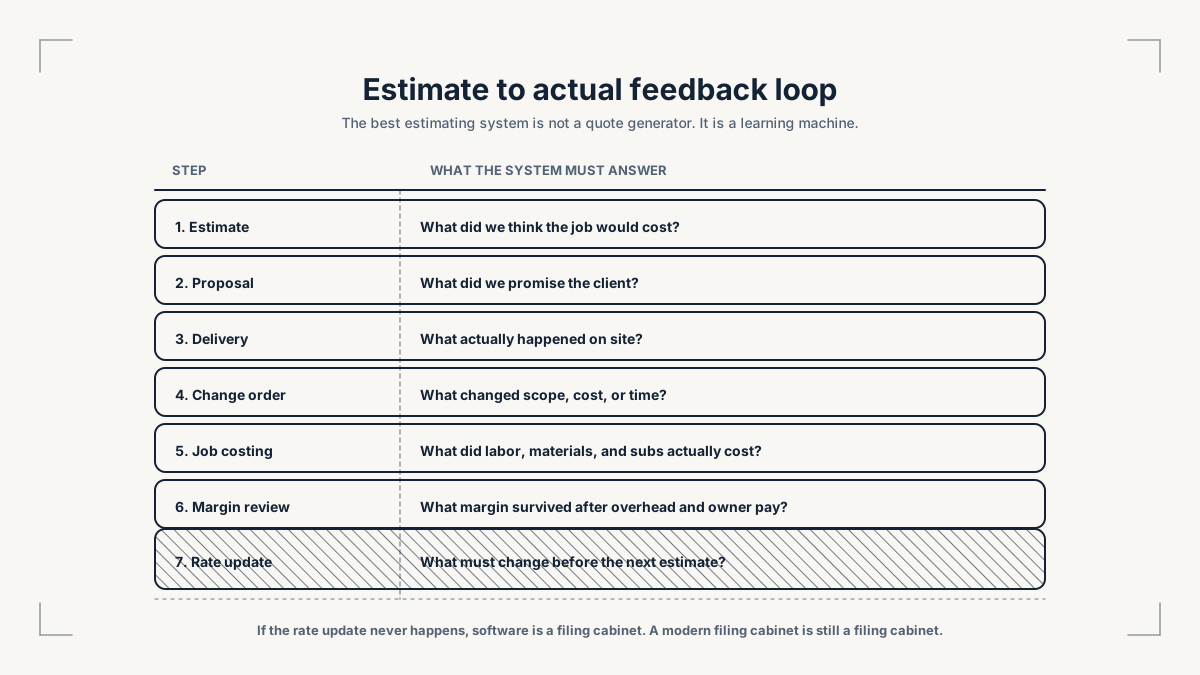
That last step is where software becomes commercially useful.
If the business never updates rates, templates, allowances, or risk rules after each job, software becomes a filing cabinet. A modern filing cabinet is still a filing cabinet.
The contractor should review at least:
- estimated labor hours versus actual labor hours,
- estimated materials versus purchased materials,
- subcontractor estimate versus final subcontractor cost,
- change orders captured versus changes performed,
- warranty callbacks,
- gross margin by project type,
- net margin after overhead and owner pay,
- and lead source profitability.
This is the difference between being busy and getting smarter.
How should a contractor evaluate vendors?
The demo should not start with the vendor's feature list.
It should start with the contractor's failure points.
Before booking demos, write down:
- The job types you estimate most often.
- The pricing model used for each job type.
- The cost categories you must recover.
- The most common estimating mistakes.
- The changes that usually damage margin.
- The reports you need every month.
- The systems the tool must connect to.
Then ask vendors practical questions:
Can we build loaded labor rates, not only hourly wages?
The tool can support real labor cost
Can we separate overhead, owner time, risk reserve, and profit?
The tool can support a complete cost floor
Can we create job-type templates?
The tool can separate routine and custom work
Can allowances be tracked against final selections?
The tool can manage undecided client choices
Can change orders update cost, price, and timeline?
The tool can protect scope changes
Can we compare estimate to actual by job type?
The tool can improve future pricing
Can field updates reach estimating and accounting?
The tool can reduce handoff leakage
Can we export or integrate cleanly?
The business is not trapped in manual double entry
If the vendor cannot show the workflow using a real job type, the contractor should be careful. A polished demo with generic sample data may not reveal whether the tool fits the business.
What does this reveal about Forja contestants, sponsors, and partners?
Software choice is a serious signal in Forja's world.
A founder who buys tools before understanding pricing may look operationally sophisticated but still build weak economics. A founder who refuses all tools may stay trapped in owner dependency and manual admin. The stronger operator knows what must be systematized.
Forja judges and partners should care about that distinction.
For software partners, the best audience is not contractors looking for a quick list of tools. It is operators who understand what a tool is meant to fix.
For finance partners, better estimating and job costing can make margin, cash flow, and repayment capacity easier to understand.
For suppliers, cleaner estimating can improve material planning and reduce last-minute chaos.
For education partners, the opportunity is not only teaching software. It is teaching the commercial discipline software should enforce.
The article's core point is therefore not anti-software.
It is pro-discipline.
Contractor software matters when it helps the business price, deliver, learn, and protect trust.
FAQ
What is contractor estimating software?
Contractor estimating software helps contractors build estimates, price work, create proposals, manage cost data, and sometimes connect estimates to takeoff, change orders, job costing, invoicing, and reporting.
Is estimating software worth it for small contractors?
It can be worth it if the contractor knows what the tool must track. If the business still lacks loaded labor rates, overhead recovery, owner pay, risk rules, and change-order discipline, software may make estimates faster without making them safer.
What should contractors fix before buying estimating software?
They should define direct costs, labor burden, overhead, owner pay, risk reserve, profit target, pricing model, assumptions, exclusions, allowance rules, and change-order triggers.
What is the difference between estimating software and job costing software?
Estimating software helps price the work before it is sold. Job costing software compares the estimate with what the work actually cost after labor, materials, subcontractors, equipment, changes, and billing are recorded.
Should contractors use one tool or several tools?
Use the fewest tools that can reliably support the workflow. Multiple tools can work if data moves cleanly between them. They become risky when the owner has to manually reconcile scope, costs, messages, approvals, invoices, and job results.
What is the best contractor estimating software?
There is no universal best tool. The right tool depends on job type, team size, trade, pricing model, cost data, reporting needs, integrations, and the contractor's ability to compare estimate to actual.
Use this to define cost, risk, owner pay, overhead recovery, and margin before software selection.
Use this when the tool decision depends on loaded labor, overhead, owner pay, and the walk-away floor.
Use this when software must support allowances, T&M, cost-plus, and change-order discipline.
THE FORGE
Use the Estimate Margin Audit
Audit the margin in your next estimate before the quote leaves. Score the six controls, see the weakness costing the most margin, and get one partner-tool recommendation matched to the problem.
Use the Estimate Margin Audit