

Search "when does an HVAC business need software" and every answer tells you to buy now. That is not a coincidence. Almost every result on that page is published by a software company, so almost every result reaches the same conclusion: you need software, and theirs is the one. It is the most conflicted advice in the trade.
Here is the operator answer instead. Most early HVAC shops are not ready for field service software yet, and buying it too early costs you real money, time, and focus. But there is a clear point where it stops being a distraction and starts paying for itself, and when you hit that point the choice is far simpler than the comparison pages make it look.
This is the readiness test. You will learn the one trigger that means you are genuinely ready, what software actually returns when you are, what buying too early really costs, how to choose without overthinking the brand, how to switch without wrecking your busy season, and what to do if you already bought more than you need. Field service management software runs your scheduling, dispatch, customer history, invoicing, and reporting in one place. It enforces an operating process. It does not create one. Hold that line and the rest of this gets easy.
KEY TAKEAWAYS
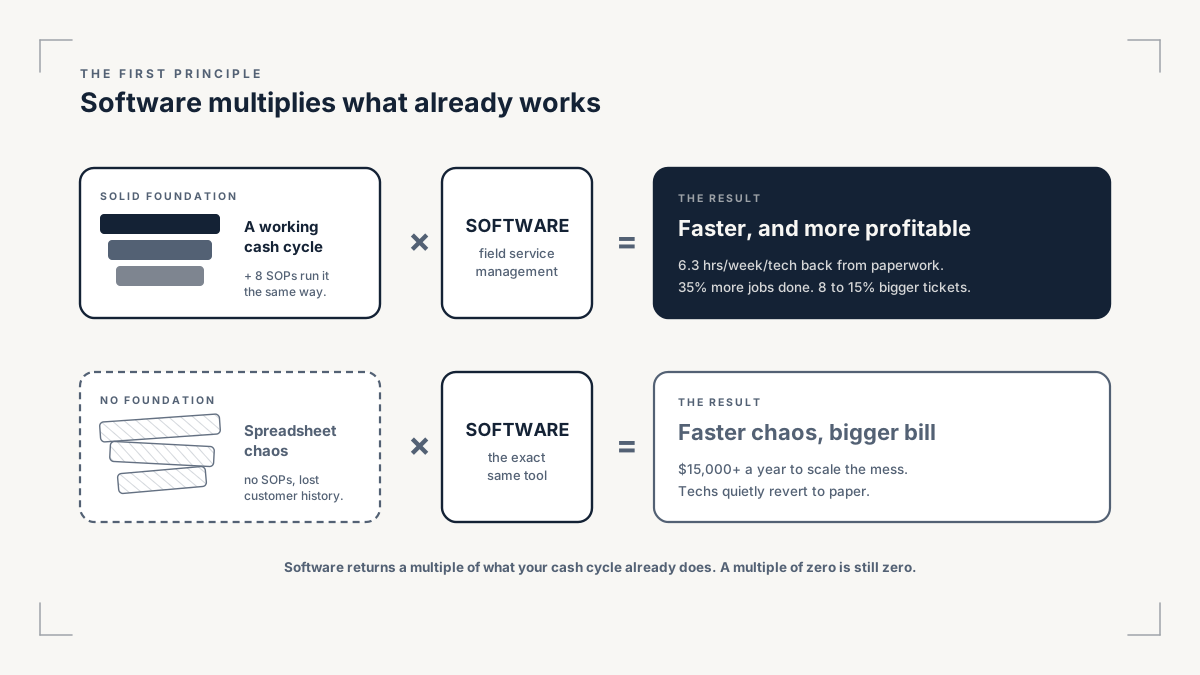
- Software is a multiplier, not a foundation. It speeds up the process you already run. On a broken process, it just makes the mess faster.
- Buying too early is a second job. Learning a tool you do not need yet steals the time, money, and energy your young shop should spend booking, quoting, invoicing, and delivering.
- The trigger to switch is slippage, not size. You are ready when manual tracking gets confusing and work starts slipping: leads answered late, estimates out late, invoices late.
- When you are ready, the return is real: software can cut roughly $4,800 per employee a year in admin, lift first-time fix by double digits, and at scale surface revenue you are currently leaving on the table.
- Match the tool to your stage, not your ego. An underutilized ServiceTitan costs more than a fully used Jobber, every time. The only real test: does it optimize your operation? If not, drop it, and never buy because a competitor uses it.
1. Software is a multiplier, not your job
When you are starting out or running one truck, your job is the cash cycle, and nothing else. You book the call and the site visit. You get the estimate out. You send the invoice. You collect the payment. You deliver the work. You earn a review from a happy customer. That loop, run well and run fast, is the entire business at this stage.
Field service software does not do that loop for you. It organizes a loop you already run. So when an early operator buys a platform, they hand themselves a second job: learning to navigate a tool, training on it, and keeping it fed, all while the real work waits. That is money, time, and energy a young shop cannot spare, spent on a skill the business did not need yet. The most expensive thing about premature software is not the subscription. It is the focus it pulls off the work that actually pays.
There is a deeper reason this backfires. Software enforces a process. It cannot invent one. If your dispatch, your quoting, and your follow-up are not yet written down and repeatable, a platform will not fix them. It will automate the chaos and charge you monthly for it. Most HVAC shops do not have a growth problem, they have an execution problem, and the fix for an execution problem is a written procedure, not a login. Before you spend a dollar on software, write the procedures the software would enforce. That is exactly what the eight one-page SOPs every HVAC operation needs are for, and they sit inside the wider operator's playbook this article belongs to.
2. What software actually buys you
Software is worth buying the moment it returns more than it costs in time and focus. So before you judge whether you are ready, it helps to know what a good platform actually gives back, because the numbers are real once you have the volume to use them.
Start with the admin it removes. A field service platform kills double data entry, the same job details typed into a calendar, then a spreadsheet, then an invoice. Eliminating that saves around $4,800 per employee per year in overhead. On top of that, technicians reclaim roughly 6.3 hours a week each that used to disappear into paperwork, and the reporting that ate two hours every week becomes a number on a screen. For a shop with a few techs and an office person, that is a part-time salary handed back to you.
Then look at throughput, the extra work the same crew can finish. Operators who switch typically see a 20 to 40 percent drop in the time from booking to a truck rolling and one to two extra calls per tech per week from smarter routing, and one HVAC case study saw a 35 percent jump in daily completions within three months, helped by 25 to 35 percent less travel time once routing is automated. Those are not soft gains. They are billable hours you were already paying for and losing.
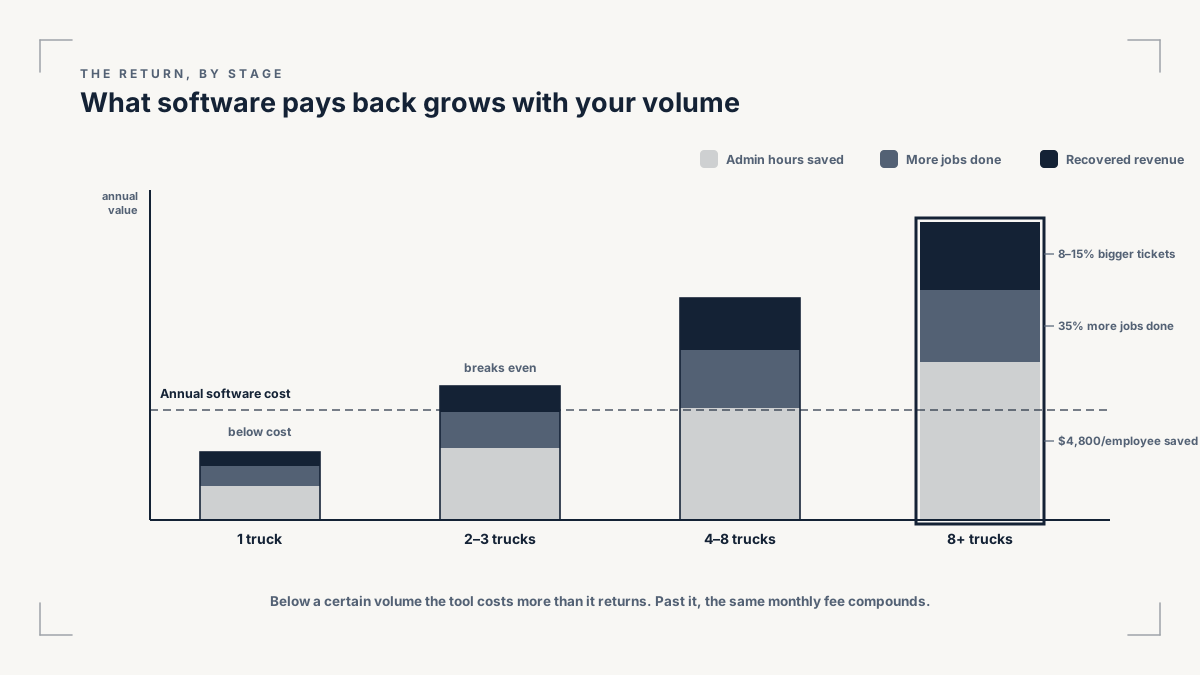
Finally, the revenue it protects and recovers. Mobile work orders and in-app pricebooks lift first-time fix rates by more than 20 percent and add 8 to 15 percent to the average ticket, because the tech has the history, the price, and the part list in hand. At scale, the analytics go further: a platform like ServiceTitan markets real revenue recovery from unsold estimates and lapsed maintenance agreements, though that payback only shows up once you are well past twenty techs and a few million in revenue, and the actual amount varies by operation.
Read that last point twice, because it is the catch. Every number above assumes a process worth automating and the volume to use it. A platform layered on a broken or tiny operation returns close to nothing, because there is nothing yet for it to multiply. The gain is real. It just arrives on a schedule, and the schedule is set by your operation, not the sales rep.
3. The real trigger: slippage, not size
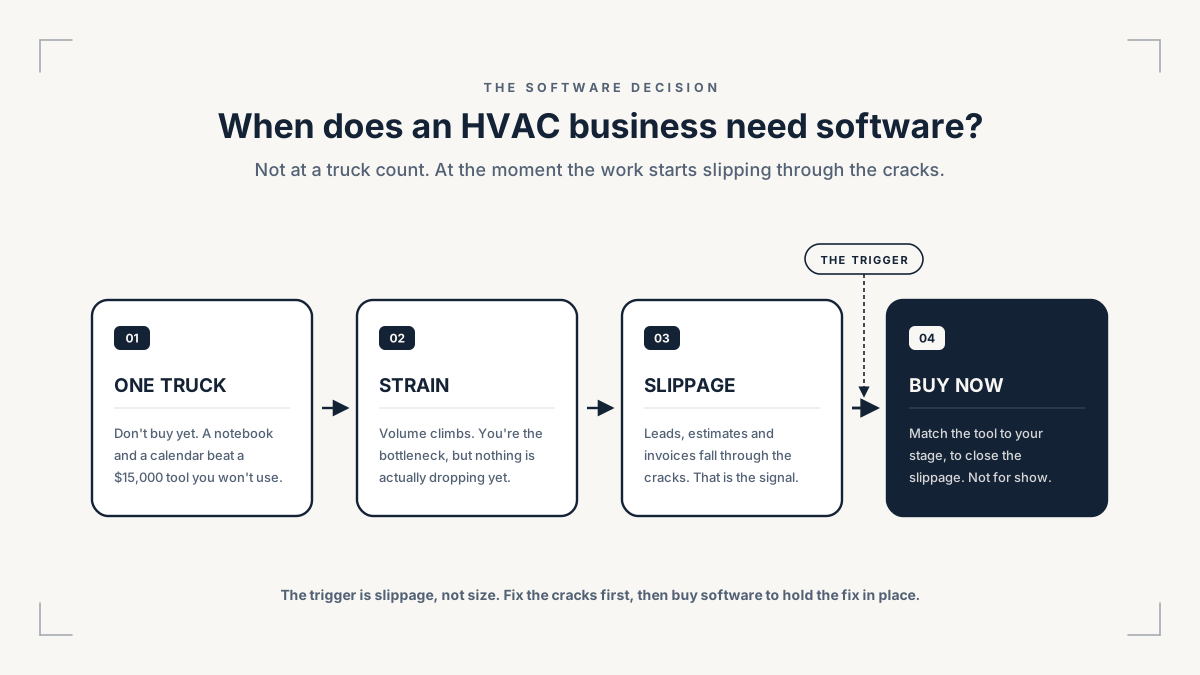
So how do you know you have arrived? Not by revenue, and not by truck count. The honest trigger is slippage. You are ready when tracking the work by hand has become overwhelming and confusing, and you start to see the operation slip because of it.
Slippage has a specific look. Leads sit too long before anyone answers them. Estimates go out a day or two late, and you lose them to a faster competitor. Invoices get sent late, which means cash comes in late, which means the next job starts late. When the manual system stops keeping up, the delays show up first in the cash cycle, and every delayed invoice quietly pushes a delivery back.
There are concrete failure signs that almost always come with it. A repeat customer calls and you have no record of what you did last time, so you re-ask questions they already answered and quote a price that does not match what they paid before. Your dispatch board is a whiteboard or a shared sheet that three people edit at once, and at volume that produces double-bookings and a typo that sends a tech to the wrong address, burning two hours of billable time and the fuel to match. Reporting takes more than two hours to assemble, and when someone asks "what is our average job value," you cannot answer without digging. And often the books software is doing double duty: QuickBooks is holding the operation together when it was only ever built for the books.
Notice that none of those signs is about size. A two-truck shop drowning in sticky notes is readier for software than a clean five-truck shop running tight written procedures. Size tells you nothing. Slippage tells you everything.
4. The Software Readiness Test: score yourself
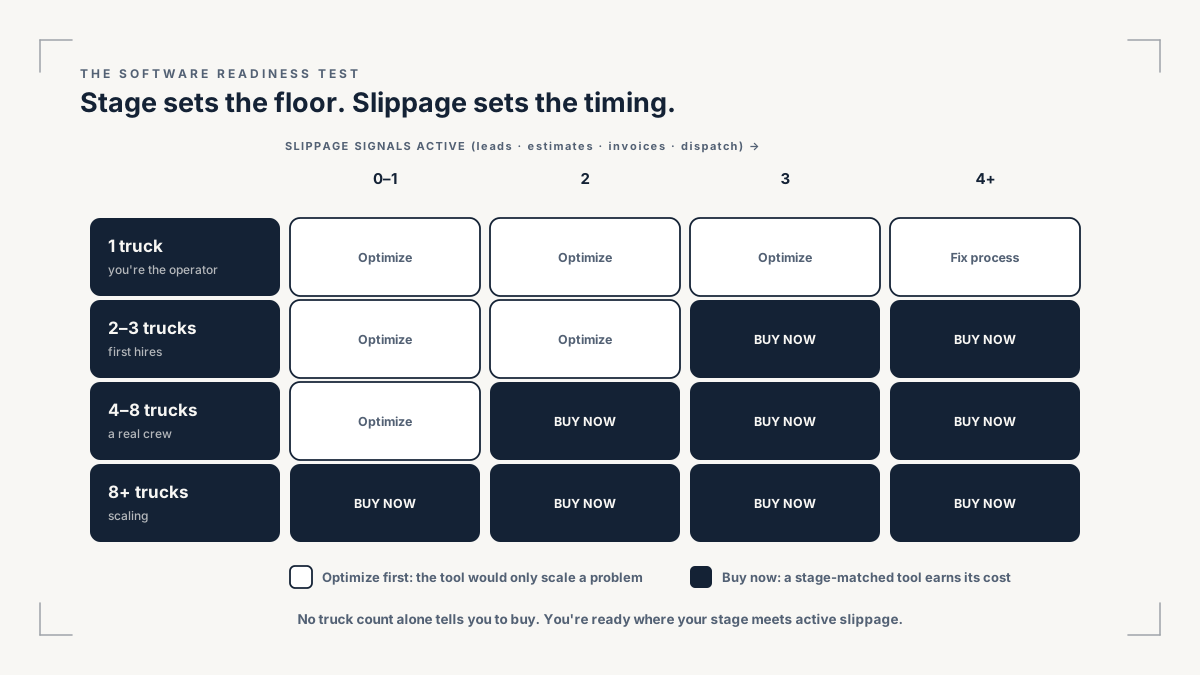
Put the two halves together, your stage and your slippage, and you get a simple decision. Read your stage, count your triggers, and the verdict falls out.
1 truck, owner-operator
Shared calendar, a simple invoicing app, QuickBooks for the books, and your one-page SOPs
Do not buy field service software yet
You can still hold the whole day in your head and a notebook
2 to 3 trucks
A light scheduling and invoicing tool, only if slippage shows
Watch, or pilot something small
The first slippage signs appear
Ready, any stage with three or more triggers true
Match the tool to the stage below
Buy now, stage-matched
Late leads, late estimates, late invoices, dispatch chaos, lost history, or reporting you cannot do
1 to 5 trucks, roughly $500K to $2M
Jobber tier
Buy Jobber
Ready, but enterprise weight is not justified
Scaling, $2M and up, multiple techs and crews
ServiceTitan
Buy ServiceTitan
Dispatch, estimating, and job costing have outgrown spreadsheets across the team
Now score yourself. Count how many of these are true right now: leads answered late, estimates out late, invoices out late, dispatch chaos at volume, lost customer history, and reporting you cannot assemble in a sitting. Zero to two means not yet, so run the cash cycle by hand and write your SOPs. Three to four means you are close, so pilot a light tool and watch the trend. Five or more means buy now, stage-matched, because the manual system is already costing you jobs.
If you score low, you are not behind. You are normal. Only about 29 percent of small service businesses use field service software at all, even though the broader industry adoption sits near 63 percent. Being early is the default, not a failing.
5. What buying too early actually costs
If the return is real, why not buy ahead of the need and grow into it? Because the cost of too early is also real, and it lands hardest on the shops that can least afford it.
First, the second-job tax. Onboarding a platform takes owner hours you do not have, plus training time for every tech, plus the productivity dip while the crew fumbles with a new system mid-season. That cost does not show on the invoice, and it is the biggest one.
Then the money, and the gap is wide. ServiceTitan runs roughly $300 to $500 per tech per month, with a setup fee of $3,000 or more and a two to three month onboarding. Even a four-tech shop is looking at well over $1,200 a month before add-ons, and a first year north of $15,000. Jobber, by contrast, starts around $39 a month with no setup fee and a Connect plan near $119 that covers most small-shop needs. Same trade, very different bills.
There is a lock-in risk on top of the price. Enterprise platforms often carry annual contracts and upfront setup fees, so a tool you bought a stage too early is money you cannot get back while you wait to grow into it. That is the trap, and it has a name. The cleanest way to say it: an underutilized ServiceTitan subscription costs more than a fully used Jobber account, every time. Paying enterprise prices to use a fraction of an enterprise tool is the most common, and most expensive, software mistake an HVAC owner makes.
6. Already bought too much? How to right-size
Plenty of operators read this and realize they are not too early, they are too big. They bought up the chain because a peer did, or a sales rep sold the dream, and now the tool is a weight, not a lever. If that is you, the fix is the same discipline in reverse.
The signs you over-bought are clear. You pay per tech for seats nobody fully uses. Your techs quietly drift back to paper because the app is heavier than the job needs. You touch maybe a third of the features you are paying for. That is a tool fighting your stage. It even happens to the convinced: one well-known operator left ServiceTitan because, as a smaller shop, he could not justify the price, and only came back later once his scale finally matched the tool. The lesson is fit to stage, not loyalty to a brand.
Right-sizing is not failure, it is housekeeping. Downgrade the plan, cut the add-ons you do not use, or move down a tier to a lighter tool that matches where you actually are. Then run the same test you would run on any tool: is it optimizing your operation for what you pay? If not, change it without guilt.
7. How to choose without overthinking it
When you are genuinely ready, the brand question that the comparison pages stretch into 4,000 words is mostly noise. Navigating software is not your job, and choosing one should not become a research project. Here is the whole decision.
The one test is this: does the tool measurably optimize your cash cycle? Faster booking to truck, fewer missed leads, same-day invoicing. If it does, it earns its price. If it does not, you drop it. That is the entire selection rule, and it survives any feature war.
The second rule is just as important: never buy a platform because a competitor or a buddy uses it. The fear of falling behind is exactly what drives premature, oversized purchases. Their stage is not your stage, and their slippage is not your slippage.
When you do sit a demo, keep it to twenty minutes and check the few things that matter at your stage: scheduling and dispatch, mobile work orders your techs will actually open, customer history, invoicing and payments, a pricebook, and reporting you understand. Ask three questions and listen hard to the answers. Does the software adapt to my workflow, or does it force me to change how I work? What is the real onboarding time, in weeks? What are the contract terms and the setup fee? A tool that forces a workflow change on a shop that already runs well is a tool that will end up back on paper.
As for the names, here is the honest landscape so you do not have to read ten listicles.
Jobber
1 to 5 trucks, roughly $500K to $2M, HVAC-focused
Advanced routing and automation sit on higher tiers
ServiceTitan
Scaling operators, $2M and up, multiple techs and crews
Price and setup are enterprise-grade; underused, it is a money pit
Housecall Pro
Small to mid shops wanting fast setup and consumer-style booking
Less depth for complex commercial work
FieldEdge
Established HVAC shops wanting tight QuickBooks integration
Interface and mobile feel more traditional
Then match to your stage and stop. For a one to five truck shop in the $500K to $2M range, Jobber does the job without the enterprise weight. For a scaling operator whose dispatch, estimating, and job costing have outgrown spreadsheets across a real team, ServiceTitan is built for exactly that, and its analytics pay for themselves at that volume. ServiceTitan is a Forja Insights affiliate partner. The recommendation is editorial and stage-gated, and it would read the same if the partnership did not exist. Whichever you pick, the pricebook inside it only protects your margin if you set it against the price floor every quote has to clear.
8. If you switch, don't botch it
The right tool, rolled out badly, still fails. The most common way owners waste a good purchase is a rushed switch in the middle of the busy season.
Before you cut over, clean and export your data: the customer list, the pricebook, the equipment history, and every open job. Software multiplies whatever you feed it, so feeding it a messy customer list just gives you a faster mess.
Run the old system and the new one in parallel for about two weeks. The owners who try to flip everything over in a single weekend tend to rush back to the old tool within thirty days, because they never gave the crew time to trust it. Two weeks of overlap is cheaper than a failed migration.
Load the procedures you already wrote. The platform is there to enforce your dispatch SOP and your quote SOP, not to invent them, which is the whole reason you write the SOPs before you buy the software. Then, in week one, watch three numbers to confirm the tool is actually optimizing: the time from booking to a truck rolling, the share of invoices sent the same day, and the count of leads that slipped. If those move the right way, you chose well. If they do not, you run the optimize-or-drop test and act on the answer.
THE READINESS SCORECARD
Score your shop, and get the SOPs to write first
The Software Readiness Scorecard plus the eight one-page HVAC SOPs, on one printable sheet. Count your slippage triggers, read your verdict, and start the process the software would only enforce.
Open the scorecard and SOP template